
what is the samaritan Member web portal?
the samaritan Member Web Portal is a convenient online platform that allows our Members to:
-
view their account balance and spending history.
-
check their profile details.
-
view and respond to messages from their team of supporters.
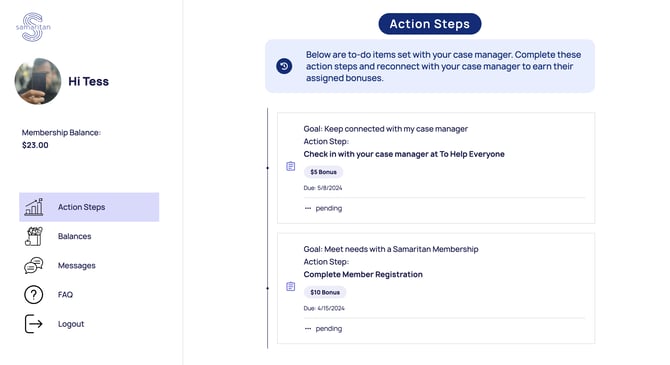
Please note that Members currently cannot edit any account details through the Member Web Portal.
how to access the Member web portal
Accessing the Member web portal is easy! here’s how:
-
if your client has a phone number or email address listed in their samaritan profile, they will receive a secure link to access their pre-authenticated portal page.
-
Members with a cell phone number on file can text “Member portal login” to the number for their city at any time to receive a new link.
-
Members can also access the web portal directly at https://www.member.samaritan.city.
first-time access to the web portal
for Members accessing the web portal for the first time, here’s what to expect:
-
Members will receive a unique link via text or email that takes them to their member profile page.
-
upon clicking the link, they will be signed into their account and directed to their member profile page.
-
Members will be prompted to fill in any missing private information to facilitate future log-ins. This may include:
-
last name.
-
date of birth (DOB).
-
PIN.
-
-
every Member will be prompted to set a PIN during their first log-in. this PIN can be used to log in if they forget their credential details.
troubleshooting: did your Member not receive a link?
if your Member has not received a link to the web portal, here are some steps to follow:
-
if they have a cell phone number associated with their samaritan Member account, they can text “Member portal login” to receive a new link.
-
if they only have an email address associated with their account, please reach out to our support team at support@samaritan.city.
what can Members do in the Member web portal?
currently, Members can:
-
view their current action steps and action step history.
-
view their samaritan Member Balance.
-
view and send messages to their team of supporters.
however, please note that Members cannot independently spend funds, update their profile details, or change the status of their action steps through the Member web portal.
Next Read: how to graduate a Member