
signing up and referring a Member: For inpatient social workers, or intake teams, this allows you to sign-up a Samaritan Member and then refer them to a partnering organization for ongoing case management.
handing off a Member: If you are leaving your organization, and need to have a peer case manager take over ongoing care, you can send a referral to other case managers at your organization and have a new team member take over case management.
Instructions:
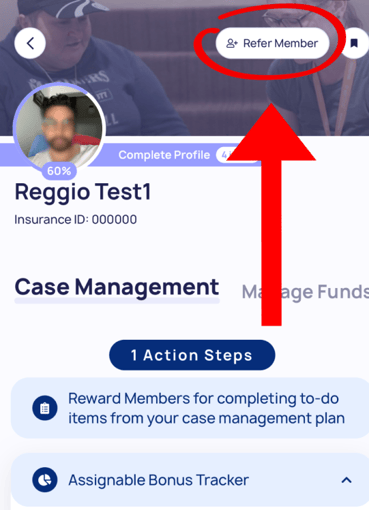
1. while on the Member’s profile, Click “Refer Member” on the top right corner
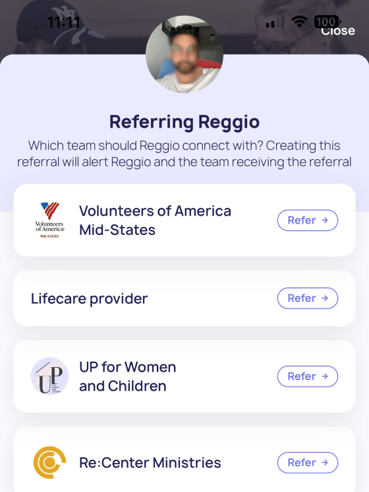
2. Pick from a list of organizations in your area, then click refer
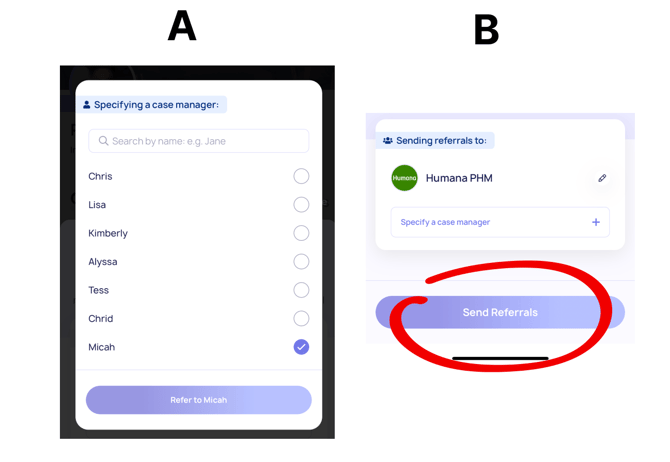
3. Either (A) Select the case manager you want to refer the Member to
or (B) Refer the Member to the entire organization
when receiving a referred Member, here are the steps:
1. The Case Manager will see that a Member has been referred to them

2. Once clicking the Member, they can see more information and choose to accept

3. Once accepted, the member will now be in their “My Members” section

next read: signing your clients up for samaritan memberships