
💻 Accessing Samaritan
On Your Mobile Device
- Download the app by searching “Samaritan” in the Google Play Store or Apple App Store
- Select the Samaritan Partner app (cream-colored background with a purple logo)
On Your Computer
- Visit: partner.samaritan.city
- Log in using your credentials
👥 Creating Your Samaritan Partner Account
Ready to get started? Follow these steps:
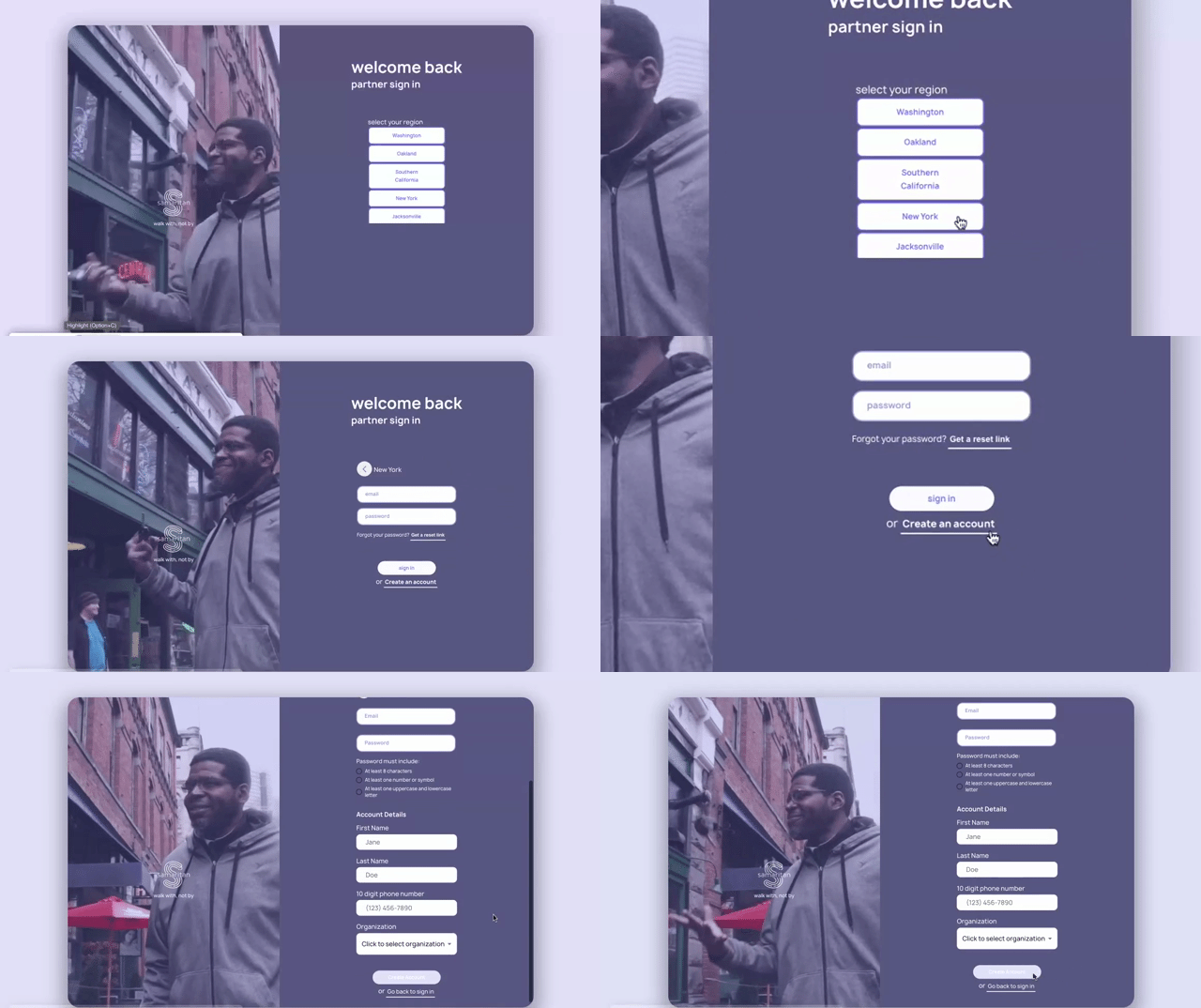
- Tap Create Account and select your region
- Choose your organization from the dropdown menu
- Enter your organization code (if provided)
- If you don’t have a code, you can leave this blank and continue
- Your account will be manually approved by the Samaritan team (typically within 24 hours)
- Enter your name, work email, and work phone number
- This information is used to send you important updates about your Members
- Your work phone number also helps ensure clients have up-to-date contact information
- Our Member Support team may share this number with clients if they request help connecting with you
✅ After Account Creation
Once your account is created, you’ll be directed to the Client List page, where you can begin adding or updating Member information.
If you see a message that says “Non-profit status approval pending”, please contact us at support@samaritan.city. Our team will assist with completing your account approval.
You’re all set!
You’re now ready to start enrolling Members and supporting their progress through Samaritan.
Next Read: signing your clients up for samaritan memberships