---
title: assigning a physical debit card
description: assigning a debit card
---
[Skip to content](https://kb.samaritan.city/partner/assigning-a-debit-card#main-content)
English
Show submenu for translations

Open main navigation
Close main navigation
- English
Show submenu for translations
- Contact us
Contact us
How can we help you?
- There are no suggestions because the search field is empty.
1. [Samaritan Partner Learning Hub](https://kb.samaritan.city/partner?hsLang=en)
2. [FAQs](https://kb.samaritan.city/partner/faqs?hsLang=en)
# assigning a physical debit card
## Follow these steps to assign a physical debit card to a member’s profile
### **💬Steps to Manage Member Funds**
1. Navigate to the **Manage Funds** tab within the member’s profile.
2. Select **Assign Physical Debit Card**.
3. Enter the **last four digits** of the debit card.
4. If prompted, create and assign a **PIN** for the card.
That’s it! The debit card will be automatically activated once it’s assigned to the member’s profile.
If you have any questions or need support, please reach out to our team at **support@samaritan.city**.
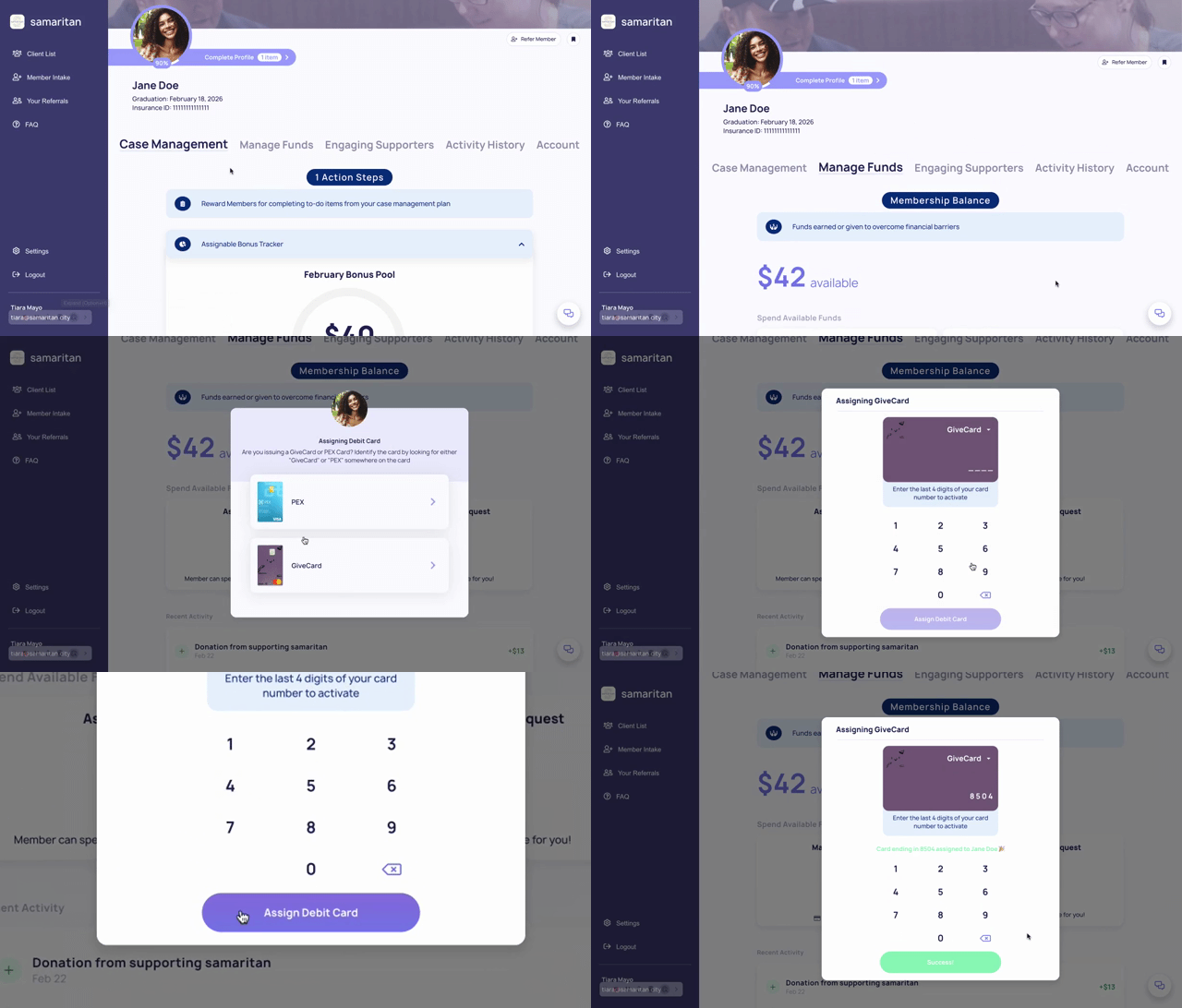
💡 Helpful Tip: You can assign either a Physical **OR** Virutal card. This guide (linked below) highlights an in-depth Givecard overview.
**[samaritan givecard experience guide](https://kb.samaritan.city/partner/samaritan-givecard-experience-guide?hsLang=en)**
***Next Read: [adding a Member to the "my Members" section of your partner home page](https://kb.samaritan.city/partner/adding-a-member-to-the-my-members-section-of-your-partner-home-page?hsLang=en)***
- [General](https://kb.samaritan.city/partner/general?hsLang=en)
- [FAQs](https://kb.samaritan.city/partner/faqs?hsLang=en)
- [Getting started](https://kb.samaritan.city/partner/getting-started?hsLang=en)
[](http://www.samaritan.city?hsLang=en)
[mailto:email@email.com](mailto:email@email.com)
Copyright © 2026, City of Samaritans, PBC