---
title: "add a Member to \"My Members\""
description: "this article contains instructions on adding a Member to the \"my Members\" section of your partner home page"
---
[Skip to content](https://kb.samaritan.city/partner/adding-a-member-to-the-my-members-section-of-your-partner-home-page#main-content)
English
Show submenu for translations

Open main navigation
Close main navigation
- English
Show submenu for translations
- Contact us
Contact us
How can we help you?
- There are no suggestions because the search field is empty.
1. [Samaritan Partner Learning Hub](https://kb.samaritan.city/partner?hsLang=en)
2. [FAQs](https://kb.samaritan.city/partner/faqs?hsLang=en)
# add a Member to "My Members"
## The “My Members” feature helps improve collaboration and continuity of care by allowing multiple care team providers to support the same Member. This is especially helpful in scenarios with dual case managers or when multiple colleagues are supporting one client. By saving (or bookmarking) a Member, you can quickly access their profile and keep your workflow organized.
### **💻 How to Save a Member**
Follow these simple steps to add a Member to your list:
**samaritan platform:[partner.samaritan.city](http://partner.samaritan.city)**
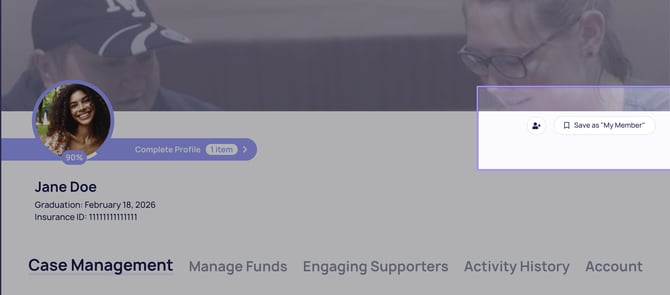
1. Navigate to the **Member’s Profile**
2. Locate the **“Save as My Member”** button in the top-right corner
3. Click the button
Once selected, the Member will appear in your **My Members** list on your homepage.
### **💬 When to Use This Feature**
Use this feature when:
- You are **co-managing a Member** with another case manager
- Multiple team members are **supporting the same client**
- You want to **bookmark a Member’s profile** for quick acces
### **📎 Why This Matters**
Saving Members allows you to:
- Quickly access profiles you work with regularly
- Stay organized across your caseload
- Support better coordination across care teams
### **You’re all set!** Your saved Members are now easily accessible, helping you work more efficiently and provide consistent, collaborative care.
***Next Read: [video guide: how to use samaritan](https://kb.samaritan.city/partner/video-guide-how-to-use-samaritan?hsLang=en)***
- [General](https://kb.samaritan.city/partner/general?hsLang=en)
- [FAQs](https://kb.samaritan.city/partner/faqs?hsLang=en)
- [Getting started](https://kb.samaritan.city/partner/getting-started?hsLang=en)
[](http://www.samaritan.city?hsLang=en)
[mailto:email@email.com](mailto:email@email.com)
Copyright © 2026, City of Samaritans, PBC